By 10 September 2026, the ABDM public dashboard counted 5,74,159 health facilities verified on the Health Facility Registry and 10,91,380 healthcare professionals verified on the professionals' registry. Every one of them started the same way: someone with an Aadhaar-linked phone, a government form, and a verifier somewhere who had to agree the details were true.
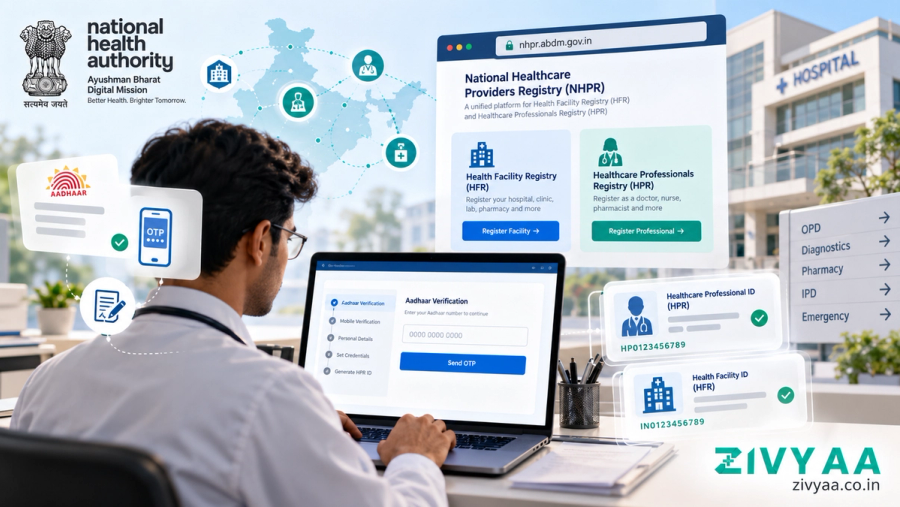
The process is not difficult. The guides to it have aged badly. Most still send you to hfr.abdm.gov.in or hpr.abdm.gov.in, and both of those addresses now redirect to a single portal — the National Healthcare Providers Registry, at nhpr.abdm.gov.in. The screens moved with it. This is the current route, what each step asks for, and where applications get held up.
Short answer: HFR registers a health facility and HPR registers a healthcare professional, and both now start at nhpr.abdm.gov.in. You create a Healthcare Professional ID using Aadhaar or other KYC, fill in the professional or facility form, and submit it for verification — by your council for HPR, and by your district's verifier for HFR.
What are HFR and HPR?
HFR, the Health Facility Registry, is ABDM's national list of health facilities, public and private, across modern and traditional medicine. According to the National Health Authority's standard operating procedure for HFR, each registered facility gets a unique 12-digit Health Facility ID, in the form IN0123456789. HPR, the Healthcare Professionals Registry, is the matching list of people: the NHPR portal names doctors from every system of medicine, nurses and pharmacists.
Both are building blocks of ABDM, the government framework that lets health records move between providers with a patient's consent. They are how a hospital's software, a doctor's prescription and a patient's record can all point at the same facility and the same doctor. The third building block is the patient's own ID, ABHA — and we have explained why an ABHA card is not an Ayushman card, which is the confusion most front desks meet first.
Neither registry is a licence. NHA's SOP says outright that HFR is not mandated to regulate or set standards for facilities; that stays with laws such as the Clinical Establishments Act, 2010. An HFR ID does not replace a clinic's registration under state law, and it is not a quality certificate.
Who can register on HFR and HPR?
HFR takes almost every kind of facility. NHA's SOP lists 34 facility types, including hospitals, clinics, dental clinics, diagnostic laboratories, imaging centres, pharmacies, blood banks, dialysis centres and physiotherapy clinics. HPR, according to the NHPR portal, takes doctors from modern medicine, dentistry, Ayurveda, Unani, Siddha, Sowa-Rigpa and homeopathy, plus nurses and pharmacists. Yoga and naturopathy professionals have their own link on the portal, and allied healthcare professionals have a separate enrolment portal at ahpr.abdm.gov.in.
The order matters, and it trips people up. A facility is registered by a person — the facility manager — and that person needs a Healthcare Professional ID before the facility form will open. In a single-doctor clinic the manager is usually the doctor. In a hospital it is often an administrator. Either way, the person comes first and the building second.
What do you need before you start?
Gather these before opening the portal, because every step is timed by an OTP:
- Aadhaar, and the mobile number linked to it. The portal also offers other KYC; a 2022 PIB release names the driving licence as an alternative for professionals.
- An email address and a mobile number for the account itself.
- For HPR: your council registration number, qualifications and place of work.
- For HFR: the facility's name exactly as written on its board, ownership, system of medicine, facility type and subtype, full address with pin code, services offered, beds and other infrastructure.
- Optional but worth having: a photograph of the building, a photograph of the name board, and an address proof.
- The Aadhaar-linked phone again at the end, for the e-signature.
How do you create a Healthcare Professional ID?
The Healthcare Professional ID is the login everything else hangs on. NHA's SOP sets out the steps; the button labels have changed with the portal, the sequence has not:
- Open nhpr.abdm.gov.in and choose Login/Registration, then the option to register and create a Healthcare Professional ID.
- Choose to generate it through Aadhaar, enter the Aadhaar number, give consent and fill in the captcha.
- Enter the OTP sent to the Aadhaar-linked mobile.
- Enter a mobile number for the account and verify it with a second OTP.
- A form opens with your name and date of birth taken from Aadhaar. Choose a user ID, add an email address, set a password and submit.
- Your Healthcare Professional ID is generated and shown on screen. Write it down.
How do you register as a doctor, nurse or pharmacist on HPR?
A professional registers on HPR by logging in with the new ID and filling in the professional form: personal details, council registration, academic qualifications and work details, as the NHPR portal lists them. The application then goes to the council or board you are registered with — the medical, dental, nursing or pharmacy council, or the national commission for your system of medicine — and, according to PIB, it is those councils that verify it.
Because the council is checking your form against its own records, the details that matter most are the ones it holds: registration number, the council's name, and your name as the council has it. If Aadhaar and the council record spell your name differently, sort that out before you submit rather than after a query comes back.
How do you register a clinic, hospital or pharmacy on HFR?
A facility is registered by its manager, from the same Healthcare Professional ID. NHA's SOP describes these steps:
- Log in and choose the role of Facility Manager.
- Choose Register a new facility and enter the facility's name, state, district, city and address.
- If the portal shows possible duplicates, check them. If your facility is already listed, select it instead of creating a second one.
- Fill every mandatory field (marked *): facility details, ownership, system of medicine, facility type and subtype, address, pin code, location on the map, services and infrastructure.
- Review the form, e-sign it through C-DAC's e-sign service and submit.
- The facility gets its 12-digit Health Facility ID straight away and appears on the portal's public search. Verification follows.
Not everything on the form is checked by the verifier. According to the SOP, verifiers see and check the name, ownership, system of medicine, facility type, address and map location; fields such as beds, services, working hours and even whether the facility uses ABDM-compliant software are self-certified by the manager. Self-certified means you are the one vouching for them, which is a reason to fill them carefully, not casually.
How long does HFR verification take, and why do applications get stuck?
NHA's SOP asks verifiers to verify or reject an HFR application within 30 days of submission. Private and state-run facilities are verified by district verifiers, appointed by the state's ABDM mission director; facilities owned by central government ministries go to national verifiers. Once verified, a facility becomes visible on the ABDM public dashboard.
The SOP also tells verifiers what to do when something looks wrong: raise a query rather than reject outright, do not reject over non-mandatory fields, do not approve duplicates, and do not verify a facility whose address does not match its location on the map. Read that list from the applicant's side and it becomes a checklist. Put the pin exactly on your building. Use the full name on your board, not an abbreviation. Answer queries promptly, because an unanswered query is an application that simply waits.
What should you do after you get your HFR ID?
An HFR ID puts the facility on the national map; it does not by itself move a single record. Exchanging records with patients and other providers needs software that implements ABDM's integrations — linking visits to a patient's ABHA and responding to consent-based requests. That is why the HFR form asks whether the facility uses ABDM-compliant software, and why it is worth asking any vendor to show those functions working rather than describing them. We have written about what ABDM integration should actually mean when choosing clinic software.
Keep the facility ID and every doctor's professional ID somewhere the front desk can find them. Check your listing on the portal's public search, the same one patients use to look up a doctor or facility. And if the portal misbehaves, NHA's toll-free line is 1800-11-4477, or 14477.
Where Zivyaa fits
Registration is something a facility does itself, on the government portal, with its own Aadhaar and its own signature. No software should do it on your behalf, Zivyaa included. Where software matters is afterwards: whether the IDs you have just earned get used consistently at registration, in records and on bills, or get retyped by hand at every desk.
That second part is what Zivyaa is being built for. ABDM integration is planned — it is not live and not certified, and nothing has launched yet. If you are registering your facility now and want to see how we are approaching what comes next, see the pricing or book a walkthrough.